Can Kafka Replace Redis for Cache Synchronization? A Production Answer
I recently came across a question on r/apachekafka that captures a common cache-synchronization problem: Can Kafka Replace Redis for Cache Synchronization Across Multiple Spring Boot Pods?
The original question, paraphrasedSpring Boot on GCP, ~25 pods, Redis currently handles cache synchronization. Considering Kafka instead: publish an event when a cache entry changes, every pod consumes it and updates its own local cache. Is Kafka a good fit here? With 25 pods, does every pod get the update, or does Kafka hand it to only one consumer? Does each pod need its own consumer group? Has anyone actually run this — what are the pros and cons?
I have experience solving this class of problem. The approach described here — a compacted Kafka topic used to materialize a local cache in every pod — is a common pattern and has been running in production systems for years. It is not a universal replacement for Redis, but it is a practical option when its consistency and operational trade-offs fit the workload. This article explains the pattern, the details that matter in practice, and a small runnable example.
The Problem: Shared Configuration on a Fast Read Path
Assume the application has configuration or reference data that every instance needs often: feature rules, routing settings, tenant settings, or similar data. It needs to be quick to retrieve, but it must also change without redeploying every pod.
A shared Redis cache is a natural solution. Every pod reads the same centrally managed value, so after an update there is one current view to consult. The trade-off is that each read leaves the process and depends on the cache service being available and responsive. Depending on the chosen cache strategy, a Redis miss can also cause an additional lookup: with cache-aside, for example, the application reads the source of truth, then populates Redis before the next request can use the cache.
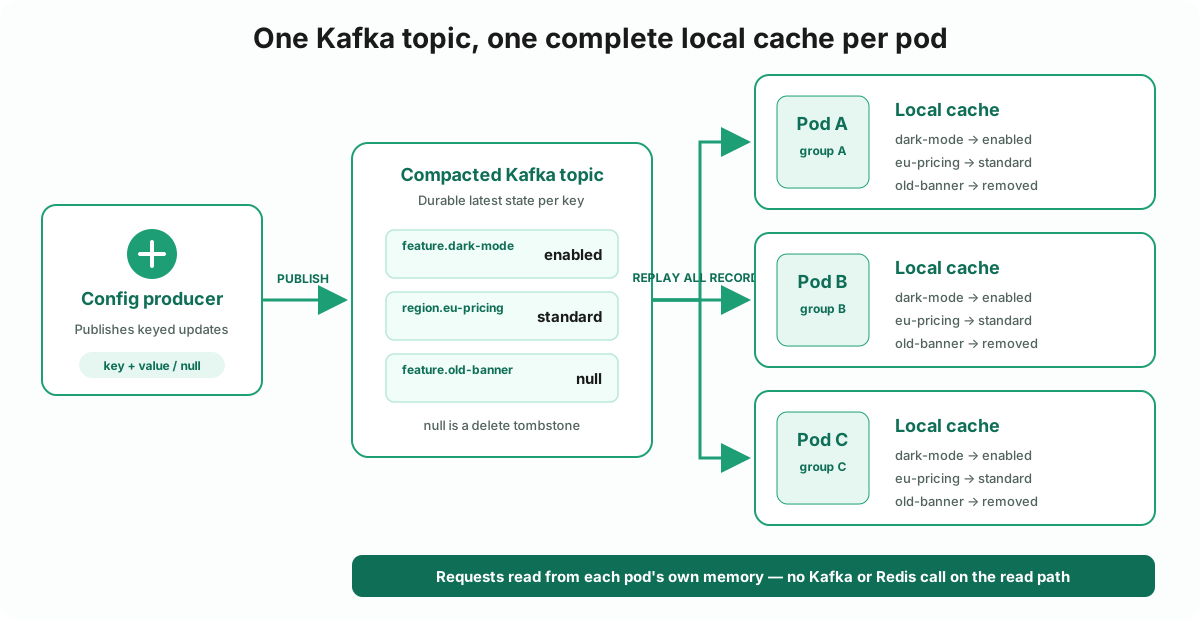
Kafka takes a different approach. An update is appended to a compacted topic, and every instance replays that topic into its own in-memory cache. Reads are then local map lookups. The replicas are eventually consistent: when a pod begins processing work, it may still have an older value while it catches up — or no value at all if consumption has failed. Later, I will show how to prevent a pod from doing real work until it has consumed the configuration. In return, Kafka provides a durable log for replay and recovery, keeps the read path inside the pod, and can support explicit schema-based serialization such as Avro, Protobuf, or JSON Schema.
Neither Kafka nor Redis is immune to failure. But if Kafka is already a dependency, using it to distribute this configuration can avoid adding Redis as another runtime dependency and another system to operate. That reduces the number of moving parts and failure modes to consider; it does not make Kafka failures disappear. This is a worthwhile trade only when eventual consistency is acceptable for the data.
Kafka can also decouple the service that publishes configuration from the services that consume it. They only need to agree on the record contract and its schema; consumers do not need a direct runtime dependency on the producer. With Redis, both sides typically need to agree on the key format and the serialized value — often the same DTO or a shared representation — and consumers must know where to read it.
| Aspect | Redis (shared cache) | Kafka (compacted topic → local cache) |
|---|---|---|
| Data view | One centrally managed cache | One materialized cache per instance |
| Consistency | One shared cache view; source changes still require correct invalidation | Eventual consistency between local replicas |
| Read path | Network round-trip; misses may require a source-of-truth lookup | In-process map lookup after the initial replay |
| Recovery / new instances | Populate or warm the cache | Replay the compacted topic |
| Record history | Not inherent to the cache | Replayable current state; compaction removes superseded values, so this is not an audit log |
| Service coupling | Shared key/value format and Redis access | Shared record schema; no direct producer dependency |
| Operational cost | Shared cache tier, plus Kafka if it is also needed | Kafka storage, consumers, and one cache per instance |
This article focuses on how to build the Kafka side safely: broadcasting every update to every instance, rebuilding the cache on startup, and refusing to do real work until that rebuild is complete.
A note on the code: the repository is a runnable demonstration, not a drop-in production library. I verified its Docker flow end to end: startup replay, readiness, live updates, and tombstone eviction. Before adopting the pattern, test it against your own volume, rebalance, serialization, retry, and outage scenarios.
TL;DR
- Yes, with a caveat: Kafka replaces Redis for broadcasting state to every pod, not for reading from one shared cache. Each pod gets its own eventually-consistent local copy.
- Every pod needs its own Kafka consumer group. Pods sharing a group split the partitions (load-balanced); pods each in their own group each get the full topic (broadcast).
- The topic must be compacted. Use more than one partition when startup replay needs concurrency, and make the local cache thread-safe when listener concurrency is enabled.
- Keep the dataset small and relatively low-volume. This pattern fits feature flags, routing rules, and service configuration—not a large or high-churn business dataset.
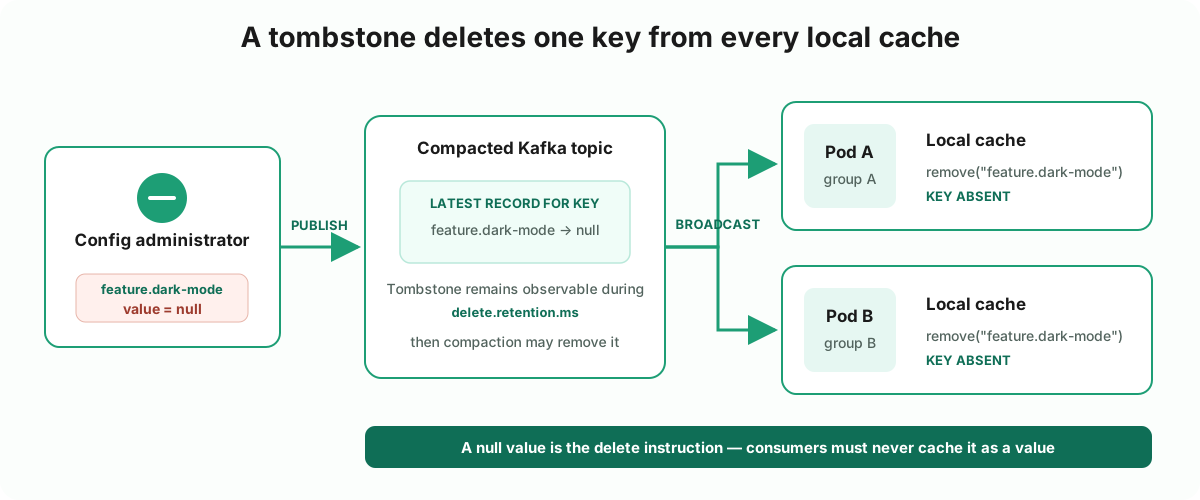
- Deletes are tombstones: a record with a null value, not a special “delete” message type.
- Wait until startup replay is complete before interacting with the outside world. Do not serve endpoints, run scheduled jobs, process queue messages, or perform other externally visible work from a partial local cache. Open readiness only after the replay is complete.
- Unique groups leave inactive offset metadata behind until Kafka’s configured retention removes it. Expect temporary clutter in consumer-group tooling and monitor the relevant broker settings.
How the Whole Flow Works
There are two phases: rebuild the local replica, then keep it updated.
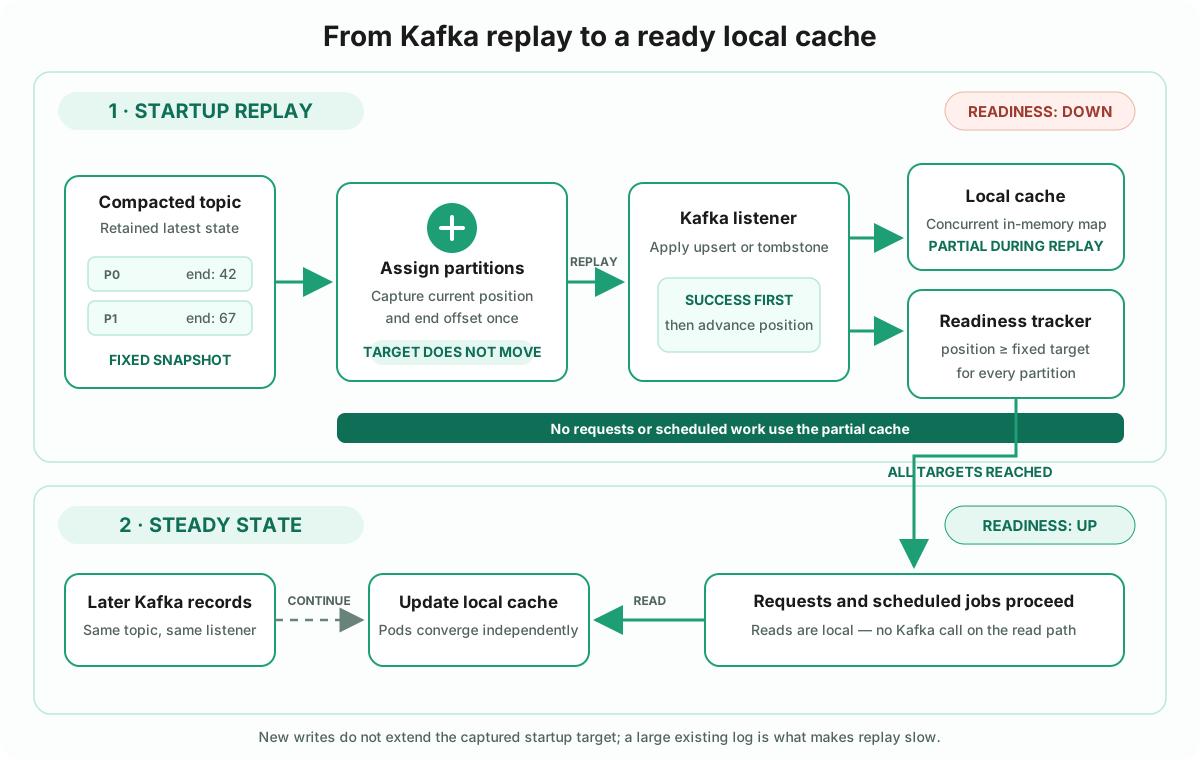
- A producer writes an upsert to the compacted topic. The Kafka record key is the configuration key; its value is the latest configuration. A null value is a tombstone that means delete.
- A new pod starts with a new consumer group and
auto.offset.reset=earliest, so Kafka assigns every topic partition to that pod’s group and replay begins from the oldest retained offsets. - During assignment, the readiness gate reads two numbers for every partition: the consumer’s current position and the partition’s end offset. That end offset becomes the fixed startup target.
- The listener applies each record to a thread-safe local map. Only after the listener returns successfully does the tracking aspect advance that partition’s processed position. A listener failure therefore cannot make the gate claim that the failed record was applied.
- When every partition reaches its captured target, readiness changes to
UP. The deployment platform may now route requests to the pod, and readiness-gated scheduled jobs may run. Reads use the local map and do not call Kafka. - The same consumer remains active after startup. New records update or delete local entries as they arrive, so pods converge independently and are eventually consistent with one another.
The fixed target in step 3 is important. If a producer writes while replay is running, the new record does not move the startup finish line forever. The consumer still processes it through the normal listener path, but readiness is defined against the snapshot captured at assignment. What can make startup slow is a large existing log, not a stream of later low-volume updates. This is why the pattern is intended for small, low-churn upsert datasets such as feature flags, routing rules, and service configuration.
Publish the Current State in a Compacted Topic
Start by creating the configuration topic with cleanup.policy=compact. Compaction retains the
latest record for each key, so a pod that starts later can replay the topic from the beginning and
reconstruct the current configuration without asking another service to warm its cache.
This works best for a small, relatively low-volume upsert topic: feature flags, routing rules, tenant settings, or similar configuration. It is not a good default for a large or high-churn dataset that every pod would need to replay and retain in memory.
Create enough partitions to let one pod replay the topic concurrently with several consumer
threads when startup time matters. The useful concurrency is capped by the partition count, and the
local cache must be thread-safe when listener concurrency is configured above one. In the example,
a one-shot kafka-topic-init service creates and seeds the topic before the application starts.
The next requirement is ensuring every pod receives that state.
Give Every Pod Its Own Consumer Group
A Kafka consumer group has one independent view of a topic: within that group, each partition is assigned to one consumer. Therefore, pods that share a group split the work; pods in separate groups each consume the complete topic.
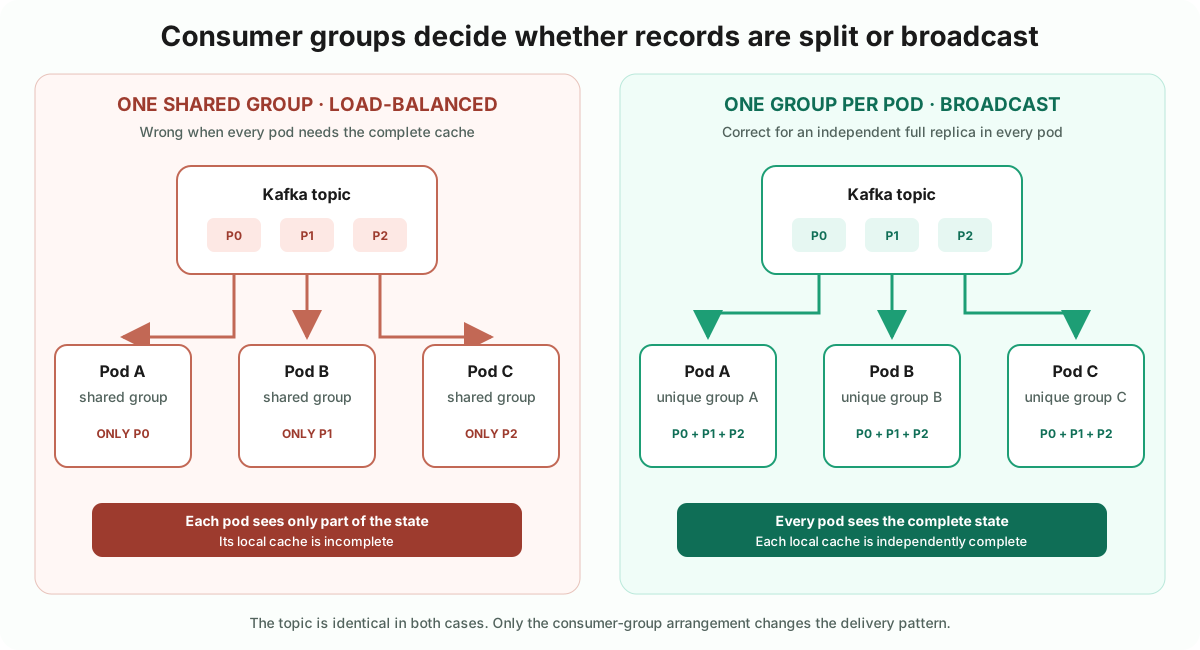
Give each pod a unique group.id. In this example, a shared prefix identifies the deployment and
Spring’s ${random.uuid} supplies the per-instance suffix:
app:
  config-topic: ${CONFIG_TOPIC:local-cache-config}
  kafka:
    bootstrap-servers: ${KAFKA_BOOTSTRAP_SERVERS:localhost:9092}
    consumer-group: ${CONSUMER_GROUP_PREFIX:local-cache-demo}-${random.uuid}
Every startup creates a new group and must rebuild its local cache. For that reason, set
auto.offset.reset to earliest in the consumer properties. latest would leave a new pod empty
until the next update arrives.
Map<String, Object> consumerProperties = Map.of(
        // other consumer properties...
        ConsumerConfig.AUTO_OFFSET_RESET_CONFIG, "earliest");
With the topic and broadcast behavior in place, each pod can now materialize the same local state.
Materialize Updates in the Local Cache
Once the topic contains the current state and every pod receives it, the listener is deliberately small: put normal records into the local cache and remove a key for a tombstone.
@Slf4j
@Component
@RequiredArgsConstructor
public class ConfigTopicListener {

    private final LocalConfigCache cache;

    @ConfigConsumer("config-topic")
    @KafkaListener(topics = "${app.config-topic}")
    public void onMessage(ConsumerRecord<String, String> record) {
        if (record.value() == null) {
            log.debug("Tombstone for key '{}' — evicting from local cache", record.key());
            cache.remove(record.key());
            return;
        }
        cache.put(record.key(), record.value());
    }
}
Normal records cover creates and updates. Deletion needs one additional convention.
Delete Configuration with Tombstones
A record with the same key and a null value is a tombstone. Compaction retains it long
enough for consumers to observe the delete, then eventually removes it. delete.retention.ms is
also the bound within which a consumer starting at offset zero must complete its scan to be
guaranteed a valid final-state snapshot, as the
Kafka broker configuration reference
explains. Configure that window from measured worst-case replay time; do not assume the default is
automatically safe for a large topic.
Hard deletion is appropriate only when the application should truly forget the configuration. If an
inactive configuration must remain available for an audit, older data, or later reactivation,
publish a normal record with active: false or deactivatedAt and keep it in the cache instead.
If the entry count is small, retaining every configuration locally can be simpler. A compacted topic
keeps the latest value per key, not every revision forever; use versioned keys or a separate history
topic when complete history is required.
The example uses a ConcurrentHashMap for LocalConfigCache. Spring Kafka starts with one
consumer thread by default, but configured listener concurrency can update the same cache from
multiple threads. The @ConfigConsumer annotation on the listener connects it to the readiness
gate described next.
At this point every pod can build the correct local state. It still must not use that state until the replay has finished.
Don’t Serve Traffic Until You’ve Caught Up
Do not receive traffic, run scheduled jobs, or perform other external work until the configuration has been consumed.
This is the part that’s easy to skip and expensive to skip. A pod that reports “ready” the moment it’s assigned partitions is ready in name only — it might have replayed three records out of three thousand. Requests hit an almost-empty cache; a scheduled job runs off stale defaults; nobody notices until someone asks why pod 14 behaved differently for two minutes after a deploy.
The example packages this concern as a small readiness-gate module. When Kafka assigns
partitions, the gate captures their current end offsets as the startup target. Each successfully
processed record advances the tracked position for its partition. Readiness opens only after every
partition reaches its captured target and no processing error remains. Empty topics work too:
their starting positions already equal their end offsets.
The target is a fixed snapshot. Records published after partition assignment do not extend it, so a continuously updated topic cannot keep the pod in startup forever. Once the captured target is reached, later records continue through the normal live-update path and remain subject to the eventual-consistency trade-off described below.
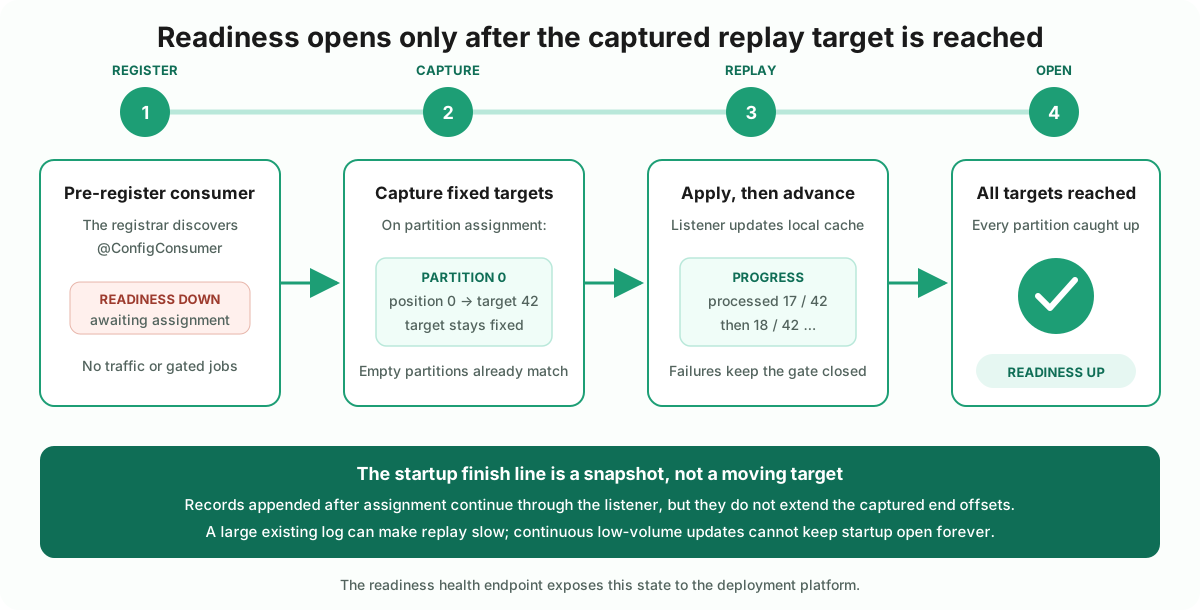
The flow has four responsibilities. First, a marker annotation identifies the @KafkaListener
method whose ConsumerRecord arguments the readiness gate tracks:
@Target(ElementType.METHOD)
@Retention(RetentionPolicy.RUNTIME)
public @interface ConfigConsumer {
    String value() default "";
}
Second, the tracker records the target end offsets captured on assignment and the next offset after each successfully processed record:
@Component
public class ConsumptionTracker {

    private final ConcurrentMap<String, ConsumerReplayProgress> progressByConsumerId =
            new ConcurrentHashMap<>();

    public void register(String consumerId) {
        progressByConsumerId.computeIfAbsent(consumerId, ignored -> new ConsumerReplayProgress());
    }

    public void onPartitionsAssigned(
            String consumerId,
            Map<TopicPartition, Long> currentPositions,
            Map<TopicPartition, Long> targetEndOffsets) {
        progressFor(consumerId).assign(currentPositions, targetEndOffsets);
    }

    public void onRecordProcessed(String consumerId, ConsumerRecord<?, ?> record) {
        progressFor(consumerId).recordSuccess(
                new TopicPartition(record.topic(), record.partition()),
                positionAfter(record));
    }

    public boolean isFullyConsumed() {
        return progressByConsumerId.isEmpty()
                || progressByConsumerId.values().stream()
                        .allMatch(ConsumerReplayProgress::isCaughtUp);
    }

    // Kafka positions identify the next record to read, not the last one already processed.
    private long positionAfter(ConsumerRecord<?, ?> record) {
        return Math.incrementExact(record.offset());
    }
}
ConsumerReplayProgress owns the assigned partitions, while a small
PartitionReplayProgress owns one partition’s current position, fixed target, and error. Keeping
those responsibilities separate makes the readiness rule explicit: every assigned partition must
reach its own target, and a failure is cleared only by a successful record from that same
partition.
An @Around aspect reports every successfully processed ConsumerRecord to the tracker
automatically — the
listener method itself never calls it directly, which is why ConfigTopicListener.onMessage above
has no readiness-related code in it at all, just the @ConfigConsumer("config-topic") annotation.
A separate registrar pre-registers every @ConfigConsumer method at startup, before the first
message arrives. A ConsumerAwareRebalanceListener supplies assignments and their captured end
offsets. That keeps readiness DOWN from startup until the listener has processed through every
target, and recalculates the target after a rebalance.
Third, expose the gate through a normal HealthIndicator in Spring Boot’s readiness health
group. This composes the cache state with Boot’s own readiness state and gives the deployment
platform one stable endpoint to poll. It also avoids competing with Boot’s application-availability
events during startup:
@Component("configConsumption")
@RequiredArgsConstructor
public class ConfigConsumptionHealthIndicator implements HealthIndicator {

    private final ConsumptionTracker tracker;

    @Override
    public Health health() {
        var details = tracker.describe();
        return tracker.isFullyConsumed()
                ? Health.up().withDetails(details).build()
                : Health.down().withDetails(details).build();
    }
}
management:
  endpoint:
    health:
      "group[readiness]":
        include: readinessState,configConsumption
/actuator/health/readiness now reports UP only after every assigned partition reaches its
captured startup target. Configure the deployment platform to hold traffic until that endpoint
returns success.
The example’s Docker Compose service uses the same endpoint as its healthcheck, so Docker marks
the application healthy only after the replay completes. This mirrors a deployment platform’s
availability check; Compose’s health status itself does not control traffic routing.
Fourth, gating scheduled jobs (or any other bean method) the same way, without repeating the
if (!tracker.isFullyConsumed()) return; check at every call site: a second annotation,
@ReadinessGated, plus its own small aspect that skips the call entirely until the gate opens —
this is what CacheSnapshotJob.logSnapshot above is actually annotated with:
@Aspect
@Component
@RequiredArgsConstructor
public class ReadinessGateAspect {

    private final ConsumptionTracker tracker;

    @Around("@annotation(com.example.company.readinessgate.ReadinessGated)")
    public Object skipUntilReady(ProceedingJoinPoint joinPoint) throws Throwable {
        if (!tracker.isFullyConsumed()) {
            log.debug("Skipping {} — readiness gate not open yet", joinPoint.getSignature().toShortString());
            return null;
        }
        return joinPoint.proceed();
    }
}
Same shape as the @ConfigConsumer aspect earlier, just pointed the other direction: that one
reports activity to the tracker, this one reads it and decides whether to let the call through
at all. It only makes sense on void methods — a skipped call returns null — which is exactly
what a @Scheduled job is.
Applying the Readiness Gate
The application must block every interaction with the outside world that depends on this configuration; otherwise, it can act on an empty or stale cache. The example implements two such gates, but the same principle applies more broadly.
For HTTP traffic, the ConfigConsumptionHealthIndicator keeps the readiness endpoint DOWN until
the replay is complete. Controllers do not need to repeat tracker.isFullyConsumed() in every
endpoint when the deployment platform uses that endpoint to withhold traffic. For example, in
Kubernetes, use a readinessProbe for routing and give a startupProbe enough time for a large
initial replay:
@GetMapping("/api/cache")
public ResponseEntity<Map<String, CacheEntry>> all() {
    return ResponseEntity.ok(cache.snapshot());
}
For a scheduled job, @ReadinessGated prevents invocation until the same tracker is ready:
@ReadinessGated
@Scheduled(fixedDelayString = "${app.cache-snapshot-job.interval}")
public void logSnapshot() {
    log.info("Local cache holds {} entries", cache.size());
}
Other external interactions need an equivalent gate. For example, a queue listener that depends on this configuration should not begin processing until the cache is ready; arrange that at the listener/container level or with an acknowledgement strategy that does not acknowledge or lose messages while the gate is closed. This example provides gates for HTTP traffic and scheduled jobs only, but the same readiness signal can drive equivalent protection for queue consumers, outgoing calls, or any other configuration-dependent work.
Where This Pattern Bites
The happy path is attractive: replay once, then serve local reads. The operational cost appears at the boundaries—startup, lag, retention, and failure. These are the decisions I would make explicit before choosing the pattern.
Every Restart Pays the Replay Cost
A new group has no offsets, so every pod rebuilds from the beginning. The cost therefore grows with
the records still present in the compacted log—not simply with the number of current keys, because
compaction is asynchronous and old segments may remain for a while. Measure replay time with
production-like data and give the startupProbe enough budget. Kafka already fetches records in
batches, so tune max.poll.records and keep per-record work cheap. For larger replays, switch the
listener to batch mode and apply each returned list in one invocation; the example’s tracking
aspect supports both individual ConsumerRecord arguments and iterable batches. Add listener
concurrency only when the topic has enough partitions to use it. Three partitions allow at most
three consumer threads in one pod to make progress in parallel.
The worst-case replay must also fit inside the topic’s tombstone retention window, or a scan from
offset zero is not guaranteed to reconstruct a valid snapshot.
The captured targets do not move when producers append new records during replay, so continuous writes do not make startup unbounded. The existing log is what determines startup time. If that log is large enough to make readiness slow or unpredictable, the topic is probably outside this pattern’s intended low-volume configuration use case.
Unique Groups Leave Temporary Metadata
Each pod generates a new consumer group. After the pod disappears, its committed offsets remain visible until Kafka removes inactive group metadata according to broker retention settings. This is usually operational clutter, not an ever-growing live workload, but it affects dashboards and any automation that assumes every listed group is active. Use an identifiable prefix, monitor the broker’s offset-retention policy, and filter inactive groups in tooling.
Large Configuration Does Not Belong in Every Pod
This pattern is a good fit for a small, frequently read configuration set. If the configuration is large, keeping the whole dataset in local memory is usually a bad idea. Every pod needs enough heap for its own copy, and adding pods multiplies that memory cost. Keep large configuration in a shared store, or materialize only the small subset each service actually needs.
Eventual Consistency Is Part of the Contract
Each pod consumes updates independently, so two pods can briefly return different values. A slow consumer, rebalance, retry, or Kafka outage can extend that gap. This is acceptable for feature flags, routing hints, and other configuration that tolerates short-lived staleness; it is a poor fit for authorization decisions, inventory, balances, or any rule that must change everywhere at the same instant. Define the tolerated lag, monitor it, and make the stale-data behavior explicit to callers before choosing this design.
These costs do not make the pattern wrong. They define its useful range: compact, replayable, eventually consistent reference data with a very hot read path and a team already comfortable operating Kafka.
Code
Code from this article is available at github.com/javaAndScriptDeveloper/kafka-backed-local-read-replica-article. The repository’s README contains the setup and run instructions, including how to inspect consumer groups, observe tombstone propagation, and scale the application locally.
Let’s Talk
If you’re running—or have run—something similar, I would like to hear where the trade-offs landed for you. Contact links are in the footer.
Frequently asked questions
Can Kafka replace Redis for cache synchronization across pods?
Yes, for the specific job of broadcasting state to every instance — it is a different tool doing a related job, not a drop-in replacement. Redis gives every pod one shared cache view, while Kafka gives every pod its own eventually-consistent copy built by replaying a compacted topic. Use this pattern when local read latency matters and short-lived staleness after an update is acceptable.
With N pods, does every pod receive every Kafka message, or does Kafka split messages across them?
It depends entirely on consumer group, not on Kafka itself. Pods sharing one consumer group get partitions split between them (load-balanced) — each message goes to exactly one pod. Give every pod its own, distinct consumer group and each group gets the full topic independently, so every pod sees every message. That’s the broadcast pattern this article covers.
How do I give every pod its own Kafka consumer group?
Combine a human-controlled prefix with Spring’s per-instance ${random.uuid} value: group-id: ${CONSUMER_GROUP_PREFIX}-${random.uuid}. Each application instance gets a unique group, so every pod consumes the full topic independently.
How do you delete a key when the Kafka topic is compacted?
Publish a tombstone: a record with the same key and a null value. Consumers that encounter it evict the key instead of caching null. Kafka eventually removes both the superseded value and the tombstone; size delete.retention.ms so a full replay can finish within that window, which Kafka documents as the bound for reconstructing a valid snapshot from offset zero.
Should scheduled jobs and traffic wait until Kafka consumption catches up?
Yes. A pod that starts serving requests or running scheduled jobs before it has replayed the topic is working from an empty or partial cache. Keep readiness DOWN until startup replay is complete. The example captures each partition’s end offset when it is assigned and opens readiness only after every processed position reaches its target.
Can continuous updates keep a new pod stuck in startup forever?
No. The readiness gate captures a fixed end offset for each partition when Kafka assigns it. Records appended after that snapshot do not move the startup target; the pod processes them as normal eventually-consistent updates. Startup can still take a long time when the existing compacted log is large, which is one reason this pattern is best for small, low-volume upsert topics such as feature flags and service configuration.